

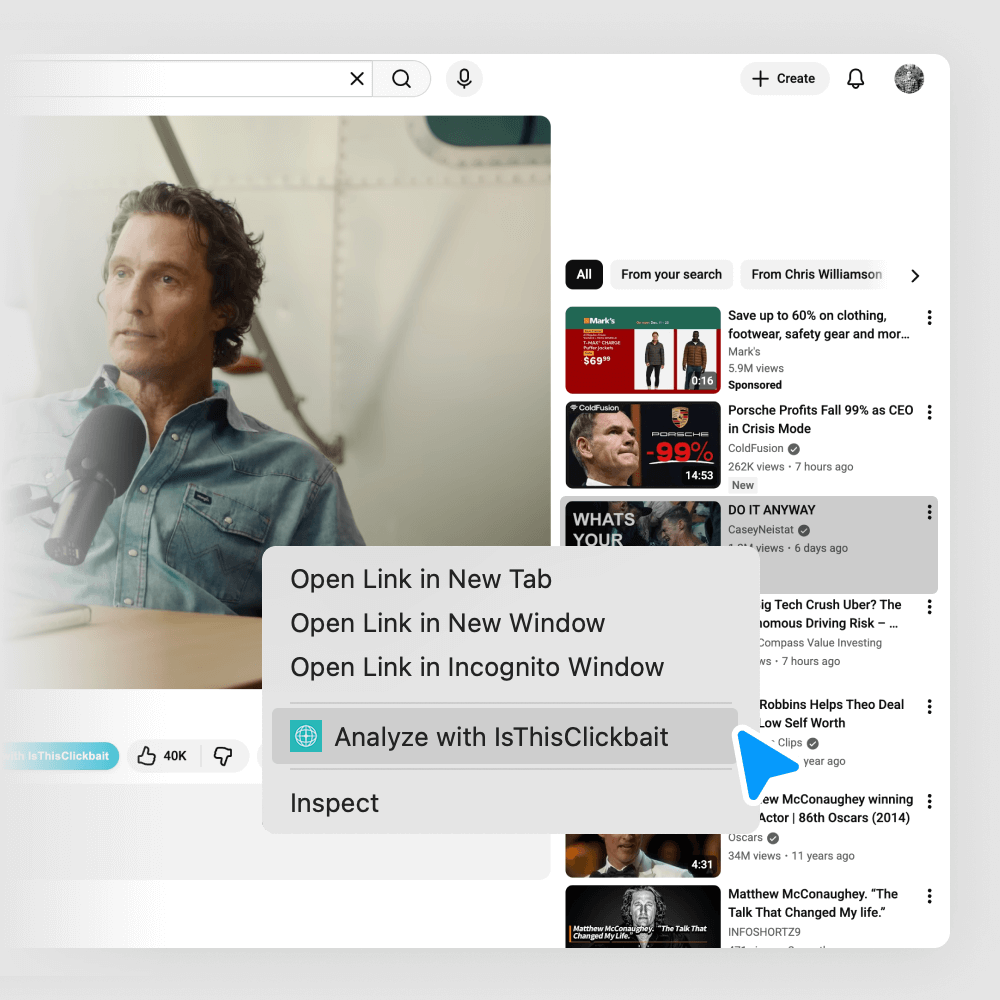



How To Use a YouTube Video Summary Tool To Finally Finish Those Long Podcasts
You click on a 2-hour YouTube podcast, get 15 minutes in, then life pulls you away. Later, you remember one smart line or story, but not where it was. Scrubbing back and forth through a giant progress bar starts to feel like a part-time job.
That is where a YouTube video summary tool can change how you watch. Instead of crawling through every minute, you get a short breakdown of the main ideas, key moments, and sometimes even direct quotes. A 2-hour podcast turns into a one-page overview you can scan in a minute or two.
This guide is for podcast listeners who want the value of long conversations without giving up whole evenings. You want quick learnings, a way to jump to the best clips, and a smarter way to decide what is worth a full watch.
You will also see how IsThisClickbait fits in. It starts as a simple headline checker that tells you if a title looks like clickbait, with a clear yes or no style judgment and a confidence score. Used together with a summary tool, it helps you cut through hype, spot honest episodes, and get more from long videos.
By the end, you will know what these tools do, why they matter for long YouTube podcasts, and a clear workflow you can try on your next episode.
What Is a YouTube Video Summary Tool and Why It Matters for Long Podcasts
A YouTube video summary tool takes a long video and turns it into a short, readable recap. Think of it as a friend who watched the whole thing and now tells you the main ideas in plain language.
For podcast and education content, this is powerful. A 3-hour tech podcast, a long founder interview, or a lecture-style video can be packed with value, but also with side stories and repetition. A summary tool pulls out what matters most.
The big benefits are simple:
- You save time, because you can scan the summary before you commit to the full video.
- You remember more, since the main points are written down in clear form.
- You jump to the best parts, using timestamps or section labels from the summary.
- You share ideas faster, by copying key claims, quotes, or bullets to your notes or chat.
Some tools also highlight themes, tone, and bold claims. For example, they might show that a podcast spends half its time on AI risk, or that the guest keeps making strong promises about “easy money” or “guaranteed results”. That ties in nicely with what IsThisClickbait does for headlines, because you can compare how the episode is sold with what is actually inside.
How a YouTube Video Summary Tool Works in Simple Terms
Most tools follow three basic steps.
- They get the transcript.
This is the text version of everything the host and guests say. Some tools pull it from YouTube, others create it with speech-to-text. - They use AI to group ideas.
The tool looks for topics, repeated points, answers to questions, and shifts in the conversation. Many use large language models, similar to chatbots, to “read” and understand the transcript. - They write a short summary and key points.
You might see a one-paragraph overview, a list of main takeaways, and sometimes timestamps for big sections.
You read the summary first, like a map. Then you decide which 5, 10, or 20 minutes are worth watching in full. Instead of guessing, you move with purpose.
Why Podcast Fans on YouTube Need Faster Summaries
Long podcasts are great for depth, but they clash with real-life schedules.
You might have:
- A backlog of episodes from your favorite tech or finance show.
- A list of “watch later” interviews that keeps growing every week.
- A fuzzy memory of what you learned from last month’s marathon episode.
Picture three quick cases:
- The AI debate fan. You enjoy 2-hour debates about AI risk, but only parts of them. A summary lets you jump to the sharpest arguments instead of sitting through every intro and small talk.
- The busy founder. You listen to founder interviews to pick up ideas, but you run a company and do not have spare hours. You use summaries to pull out 3 action ideas from each episode.
- The student. You watch lecture-style videos before exams. A summary gives you the core concepts and timestamps so you can review fast and rewatch only the tricky pieces.
In each case, a YouTube video summary tool turns a heavy time cost into a light, focused session.
How IsThisClickbait Turns Long YouTube Podcasts Into Clear, Actionable Insights
IsThisClickbait starts as a simple tool. You paste a headline, and it tells you if it looks like clickbait, with a short explanation and a confidence level. That alone is handy for news and thumbnails on YouTube.
For long podcasts, it becomes even more useful.
Big shows often rely on bold titles to stand out. “This Will Change Everything About Your Career” might hide a slow, meandering chat. Another episode with a plain title might be packed with solid advice. It is hard to tell before you click.
IsThisClickbait helps you judge which titles are built on hype and which are more fair. When you pair that with a YouTube video summary tool, you can check both the wrapper and the content. You see:
- How the episode is sold in the title.
- What the episode delivers in the summary.
That mix makes it much easier to decide if a 90-minute watch is worth your time.
From Clicky Titles to Real Takeaways: Using IsThisClickbait With Video Summaries
Here is a simple workflow you can use before your next long podcast session.
- Spot a long episode on YouTube.
Maybe you see “The Only AI Update You Need In 2025 (Massive Changes Ahead)” with a 2-hour timestamp. - Run the title through IsThisClickbait.
Paste the title and check the judgment and confidence. If it looks highly clickbait, you already know to be careful. - Use a YouTube video summary tool on the same episode.
Get the overview, key topics, and any timestamps the tool provides. - Compare the promise with the content.
Did the episode really share a single clear “only update you need”? Or did it wander through news, gossip, and ads?
If the title promised the world but the summary looks thin, you skip or skim only a small part. If the title seems fair and the summary looks strong, you save it to your watch queue with confidence.
Over time, this habit trains your eye. You waste less time on empty content and build a playlist filled with episodes that actually teach you something.
Spotting Overhyped Claims in Long Videos With AI Help
Some podcast titles are pretty clear about their style. You have seen things like:
- “This One Habit Will Make You Rich”
- “The AI Update No One Is Ready For”
- “Do This For 10 Minutes A Day To Change Your Life”
These lines grab attention, but they also raise a question in your mind. Is this real or just drama?
Here is how to test them:
- Paste the title into IsThisClickbait and read the result. If it flags strong clickbait with high confidence, treat the claim as a red flag.
- Run the episode through your YouTube video summary tool.
- Scan the summary for proof. Where is the “one habit”? What do they mean by “no one is ready”? Are there solid examples, data, or clear steps?
If the summary shows vague stories and no real method, you can safely move on. If the summary shows clear steps, real numbers, or tested ideas, then the bold title might actually be backed by content.
The AI tools do part of the heavy lifting, but you still make the final call.
Practical Ways to Use a YouTube Video Summary Tool for Learning From Podcasts
Now let us turn this into daily habits. The goal is not just to watch faster. It is to learn more from what you do watch.
When you mix a YouTube video summary tool with IsThisClickbait, you can:
- Take better notes.
- Find the exact clip you care about.
- Build a watch queue that actually helps you grow.
Turn Long Episodes Into Short Notes and Action Lists
After you run a podcast through a summary tool, do not just read the output and move on. Turn it into a tiny note.
A simple template works well:
- 3–5 bullet points with the main ideas.
- 1–2 quotes that you want to remember or share.
- 1 action step you might try in your own life or work.
For example, after a business interview, your note might include:
- “Guest focuses on boring businesses, not flashy startups.”
- “Keeps a ‘decision log’ to track big choices and results.”
- Quote: “If I cannot explain the plan on one page, I do not understand it.”
- Action: Start a simple decision log for next quarter.
Once you have this mini-note, you know whether it is worth rewatching certain parts. If one bullet point stands out, find the matching timestamp in the summary and watch that part in full.
Find the Best Moments and Timestamps Faster
Many YouTube video summary tools highlight key moments or segments. They might label them like:
- “00:12:34 – Host asks about early failure”
- “00:35:50 – Guest breaks down pricing model”
- “01:10:15 – Q&A with live audience”
Treat this as a map of the episode.
If you only care about the pricing model, you do not need the full 90 minutes. You jump straight to 00:35:50, watch 10 minutes, and get what you came for.
This also makes sharing easier. Instead of saying, “Watch this whole video, it gets good after a while”, you send a direct link to the exact moment that matters to your friend or team.
Summaries are not a full replacement for listening. They are more like a table of contents plus a book review. They show you where to focus.
Build a Smarter Watch Queue and Skip Empty Content
You can also use summaries and IsThisClickbait to plan your viewing week.
Try this four-step routine:
- Run titles through IsThisClickbait.
Flag the ones that look heavy on hype or tricks. - Skim summaries from a few episodes by the same creator.
Look for depth, clear structure, and practical ideas. - Pick one or two episodes that seem honest and dense with value.
These go into your “watch later” list. - Ignore or skim the rest.
Your queue becomes shorter but a lot sharper.
Over time, your feed turns into a personal learning channel instead of a sea of clickbait and half-useful shows.
Tips for Choosing the Right YouTube Video Summary Tool
There are many tools that claim to summarize YouTube videos. For podcast listeners, a few simple checks make a big difference.
Look for:
- Accuracy and clarity. The summary should match the episode and use plain language.
- Support for long videos. Two-hour or even three-hour content should not break it.
- Ease of use. You paste a link, click once, and get results.
- Privacy. The tool should be clear about how it handles your links and data.
- Good copy and export options. You want to move summaries into note apps or docs without pain.
- Nice pairing with other AI helpers. For example, running titles through IsThisClickbait while you read the summary.
If possible, test a tool on a podcast you already know well. If the summary matches your memory and feels honest, you are on the right track.
Key Features That Help With Long Form Podcasts
For long YouTube podcasts, some features matter more than others.
- Handles 2+ hour videos. Long episodes should process without cutting off halfway. This lets you treat one tool as your default.
- Section breaks or chapters. Clear labels for each topic act like a mini table of contents. They help you jump straight to the part you care about.
- Bullet point takeaways. A short list of big ideas makes note-taking fast and helps you recall the episode days later.
- Timestamps for highlights. Direct links to strong moments make it easy to rewatch or share.
- Tone or sentiment hints. A quick sense of whether a segment is upbeat, fearful, or sales-heavy can warn you about overhyped pitches.
Each of these features removes a small layer of friction. Together, they turn giant episodes into content you can handle in short bursts.
Balancing AI Help With Your Own Judgment
AI tools are smart, but they are not perfect.
A summary might miss a side story that matters to you, or misread a joke as a serious claim. A clickbait checker might flag a playful title as risky, even when the content is solid.
Treat both your YouTube video summary tool and IsThisClickbait as guides, not bosses.
Use them to:
- Decide what to sample.
- Find the best 10–20 minutes to watch.
- Spot patterns in the creators you follow.
Then still listen with your own ears. Pay attention to how honest the host feels, how clear the guest is, and whether the advice fits your life.
Your judgment is the filter. The AI is just a strong flashlight.
Conclusion
Long YouTube podcasts do not have to feel like homework. With a good YouTube video summary tool, you can turn hours of talk into a short, clear overview, save key quotes, and jump straight to the best moments. When you add IsThisClickbait, you also get a quick check on which titles are selling you hype and which ones match the real content.
Start small. For your next long episode, run the title through IsThisClickbait, create a summary, and watch only the parts that look worth your time. Turn the summary into 3–5 bullets and one action step, and see how much more you remember.
You can even add a simple visual workflow or before-and-after image to this process, so it is easy to review later. The goal is not to watch more, it is to learn faster from what you already watch.
Thanks for reading, and try this combo on just one podcast this week. Your watch queue will feel a lot lighter.




