

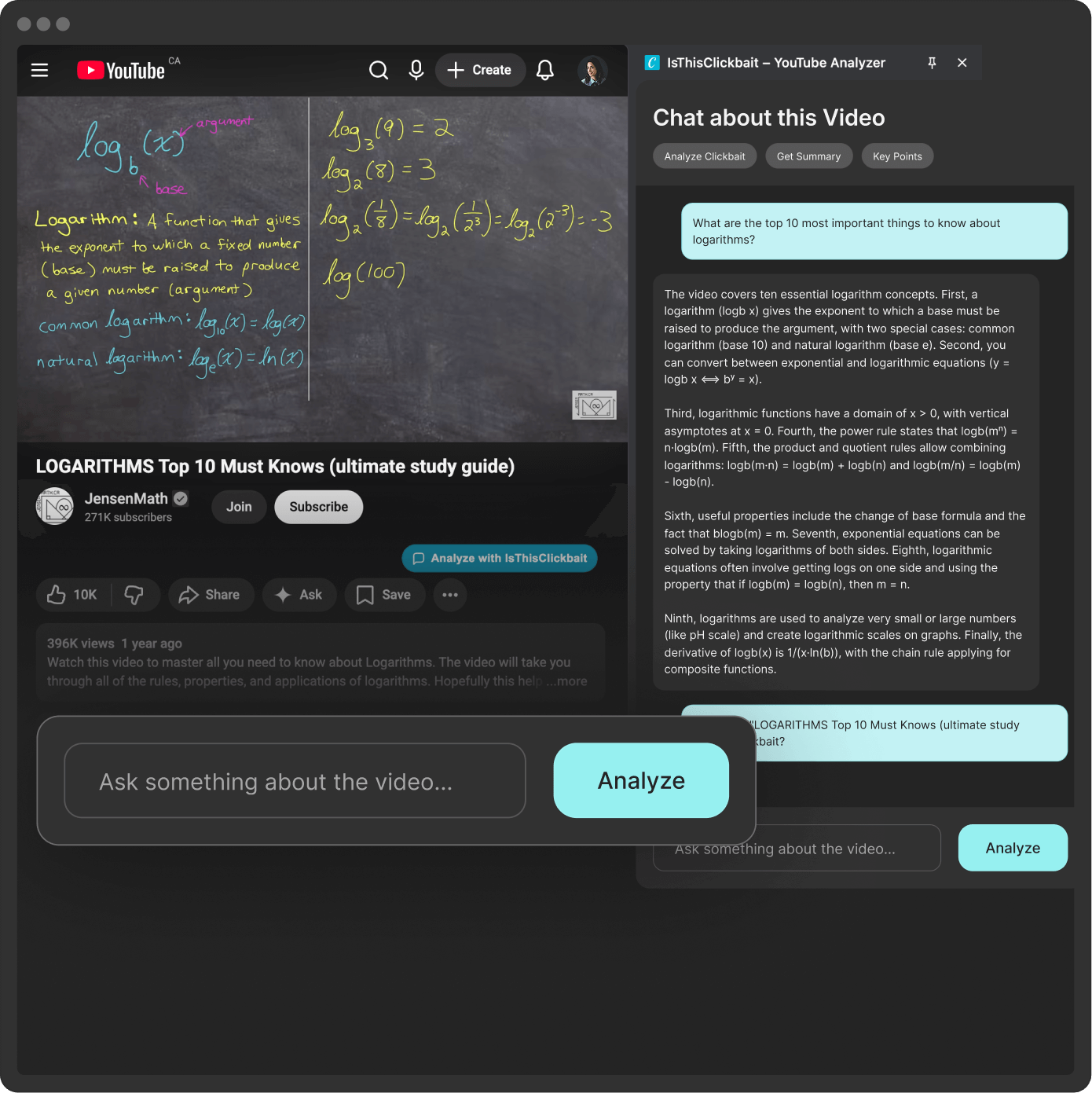



How an AI Video Summary Tool Can Save Hours on YouTube (Without Missing the Good Stuff)
YouTube is packed with smart content. Lectures, deep tutorials, podcast clips, step-by-step guides. But there is a problem. Many videos run 30, 60, even 120 minutes. Intros drag on, sponsors take time, and the key point might not show up until minute 47. If you learn or work with YouTube open on a second screen, this gets tiring fast. You want the value, not the fluff.
That is where an ai video summary tool comes in. With the help of AI, you can turn long videos into short, readable takeaways. You can scan what a video is about, pick out the key ideas, and decide in a minute if it is worth a full watch.

IsThisClickbait offers an AI tool that does exactly this for YouTube. It can pull a video transcript, write a clear summary, and even let you ask questions about the content, almost like you are chatting with the video itself. If you are tired of scrubbing through progress bars and guessing where the good part starts, this guide will show you how AI summaries can give you your time back.
What Is an AI Video Summary Tool and Why Should You Care?
An ai video summary tool is simple at heart. It is software that turns a long video transcript into a short, clear summary that you can read in a minute or two. Some tools also let you ask questions about the video, then answer using the transcript.
Here is what happens in the background, in plain language:
- The tool gets the words from the video. It uses speech-to-text or the existing YouTube transcript.
- The AI reads that text, looks for key ideas, topics, and claims.
- It writes a short version in normal language, so you can understand the main points fast.
- Some tools let you ask follow-up questions, so you can go deeper without rewatching.
The big benefit is simple: you save time. Instead of watching a 50-minute video to find one method or tip, you can read a short summary, then jump only to the part that matters.
Other perks for everyday YouTube viewers:
- You skip chit-chat and sponsor segments.
- You compare several videos on the same topic in minutes.
- You take better notes, since you see the structure of the video.
- You can re-check key ideas later without hitting play again.
For anyone who uses YouTube to learn, an ai video summary tool turns video content into something that feels closer to a quick article or a one-page cheat sheet.
How AI Turns Long YouTube Videos Into Quick Takeaways
The basic flow is easy to follow. You paste a YouTube link into the tool. The tool fetches the transcript or creates one from the audio. Once it has the words, the AI goes to work.
It looks for:
- Main topics
- Claims or lessons
- Steps, tips, or methods
- Repeated themes
Then it writes a short version in clear language. Instead of a messy transcript, you see a few short paragraphs that explain what the host says, what they teach, and what you can expect to learn.
Some tools also pull out:
- Timestamps for big sections
- Key quotes or claims
- Lists of action steps or tools mentioned
You do not have to know how the AI models work. What matters is that you drop in a link and get a useful summary back in seconds or minutes.
Time-Saving Benefits for Students, Creators, and Professionals
Different people use an ai video summary tool in different ways, but the core benefit is the same: hours of watching turn into minutes of reading. For students, it might look like this. You paste a 90-minute lecture into the tool, skim the summary before class, then go back later to re-check parts you did not understand. For creators, you can scan five competitor videos on a topic before you hit record. You see what other channels cover, where they repeat each other, and where you can offer something better. For professionals, you can catch up on a webinar or training during a short break. Instead of blocking an entire afternoon, you read the summary, then only watch the sections that apply to your job. In every case, the tool turns YouTube from a time sink into a faster learning channel.
How IsThisClickbait Uses AI to Analyze and Summarize YouTube Videos
IsThisClickbait started as a way to judge YouTube titles, to see if they were honest or pure clickbait. Now it also includes an AI video summary tool that goes beyond the title and into the full content of the video. The idea is simple. You should not have to guess if a title is true, or watch an hour of video just to check. IsThisClickbait lets you drop in a YouTube link, then the AI reads the full transcript, writes a short summary, and lets you chat with the content.

Instead of scrolling through comments or skipping around the progress bar, you can:
- See what the host actually says
- Check if the video matches the promise in the title
- Pull out key tips, tools, and steps without watching every second
The tool works on short and long videos, from quick how-tos to two-hour podcasts.
Paste a YouTube Link, Get a Clear AI Summary You Can Skim
The user flow inside IsThisClickbait is built for busy people. You find a YouTube video, copy the link, then paste it into IsThisClickbait. The AI collects or builds the transcript, runs its analysis, and gives you a clear summary.
This works with:
- YouTube Shorts and other short clips
- Standard 8 to 15-minute tutorials
- Long-form talks, podcasts, and live streams
The summary is written in simple language, so you do not need any special background to understand it. You can skim it on your phone before you commit to a full watch. If the summary looks weak or off-topic, you can move on to a better video without losing time. If it looks helpful, you can watch the video with a clear sense of what is coming.
Ask the AI Questions About the Video Transcript (Like a Chat With the Video)
The best part of IsThisClickbait is that you are not stuck with a single static summary. After the AI writes its overview, you can ask questions about the video, almost like you are chatting with the host.
You might type:
- “What are the 3 main tips the creator shares?”
- “What tools or apps does the host recommend?”
- “How does the speaker say to get started?”
The AI answers based on the actual transcript, not on a guess. This is powerful for long content such as podcasts, lectures, tutorials, and deep technical guides. You can jump straight to the part that answers your question, or copy the answer into your notes. No more hunting through timestamps or trying to remember where you heard that one key idea.
Use IsThisClickbait to Double-Check Clickbait Titles Before You Watch
IsThisClickbait still lives up to its name. The site does not only summarize videos, it also looks at titles and headlines. You can use the AI summary to see if a video really matches its bold title. If the title promises “secret hacks” but the summary shows basic advice, you know the content may not be worth your time. IsThisClickbait can also scan titles and headlines for strong, emotional language. This pairs well with the video summary feature, since you can judge both the promise and the actual content before you watch.
Smart Ways to Use an AI Video Summary Tool to Save Hours on YouTube
You get the idea, but how do you fit an ai video summary tool into your daily habits? The key is to build small, repeatable workflows that match how you already use YouTube.

Here are a few smart ways to do that.
Triage Long Videos: Decide in Minutes What Is Worth Watching in Full
When you see a 45-minute video on your homepage, you might think, “I do not have time for that.” An AI summary lets you triage that video, so you know if it is worth a full watch.
A simple process:
- Paste the YouTube link into IsThisClickbait.
- Skim the summary for the main topics.
- Ask one or two questions about the parts you care about.
- Decide if you want to watch the full video, or just key sections.
Picture a coding tutorial on a new framework. The summary might show that the first 15 minutes are setup, the next 20 cover routing, and the last 10 show deployment. If you only care about routing, you can jump right there. Or imagine a marketing webinar. The summary might reveal that most of the time is spent on basic theory, with only a few minutes on real examples. You might skip it and look for a more practical video instead.
Turn YouTube Playlists Into Study Notes and Key Takeaways
Playlists are great for learning, but they can be huge. Ten videos at 30 minutes each is five hours of content. An ai video summary tool can turn that pile of watch time into a short stack of study notes.
You can:
- Run each video in the playlist through IsThisClickbait.
- Copy the summaries into one document.
- Highlight recurring ideas and new concepts.
- Add your own notes, questions, and screenshots.
This works well for exam prep, self-paced skill learning, or onboarding at a new job. You end up with a simple study guide made from the best parts of several videos, not a random mix of watch history. You still have the videos if you want to watch a full lesson. You just do not start from zero every time.
Use AI Summaries to Speed Up Content Research and Script Writing
If you create content yourself, an ai video summary tool can keep your research fast and honest.
Instead of watching every competitor video in full, you can:
- Summarize several videos on your topic.
- Compare which problems they say they solve.
- Note which steps they explain well, and which they skip.
You might even ask questions like, “What problems does this host ignore?” or “What doubts does the speaker not answer?” Those gaps can turn into sections of your own video or blog post. This keeps your content more focused and more honest. You know what viewers have already heard, so you can add real value instead of repeating the same vague tips.
Tips, Limits, and FAQs About Using AI to Summarize YouTube Videos
AI is powerful, but it is not magic. To get the best results from an ai video summary tool, you need to know what it does well, and where it can miss the mark.
How to Get Better AI Summaries (And What AI Still Gets Wrong)
You can improve your summaries with a few simple habits. Use clean links from public YouTube videos. Private or age-restricted videos might not work well. If the audio is very noisy, the transcript might have errors, and the summary can suffer. Ask specific questions. “What is this video about?” is less helpful than “What steps does the host give to set up the software?” Clear questions usually lead to clearer answers.
For important topics, double-check key facts in the video itself. AI can miss small details, mix up numbers, or skip edge cases. AI also struggles with parts of videos that rely on visuals, humor, or tone. If a joke depends on a chart on screen, the transcript may not capture it. The same goes for facial expressions, sarcasm, or visual demos. Treat summaries as a strong shortcut, not a perfect replacement.
Common Questions About AI Video Summary Tools
Can I trust AI summaries instead of watching the video?
For casual learning or early research, yes, they are often enough. If the topic affects your money, health, or important work, use the summary to guide you, then watch key parts of the video to confirm.
Can AI summaries replace note-taking?
They help a lot, but your own notes still matter. The AI can give you the structure and main ideas, while your notes capture what you find hard, what you want to try, and how it connects to other things you know.
Is it safe and private to paste video links?
Most tools only need the public link and transcript. Still, you should read the tool’s privacy policy and terms. If you work with internal company videos or sensitive topics, check with your team before using any third-party service.
Conclusion
Long YouTube videos can be full of value, but they also eat up your time. An ai video summary tool lets you keep the value and cut the waste. IsThisClickbait makes this easy. It analyzes YouTube transcripts, writes clear summaries, and lets you ask questions about any part of the video, from quick shorts to long podcasts and lectures. Try it on your next lecture, podcast, or tutorial. Drop the link in, read the summary, and see how much time you save by only watching what matters. Pick one video you planned to watch today, run it through IsThisClickbait, and see how different YouTube feels when you are in control of your time.




